Drop a case onto a plan — the target appears only while you drag
Grab a test case from the Library tree, drag it down, and a drop strip materializes at the bottom of the screen — listing only the plans that can actually accept the case. Zero idle pixels, no closed ledgers reopened by accident.
From the library to a plan, without the round trip
Adding a case to a test plan used to mean opening a picker modal, finding the plan, finding the case, confirming. That's fine when you're staging a whole plan. It's friction when you've got a case open in the Library and you just want it in the regression plan, now.
So now you drag it. Grab a case from the Library tree, pull it down, and a drop strip materializes along the bottom of the screen — one chip per plan, drop, done. The case is added without ever leaving the page.
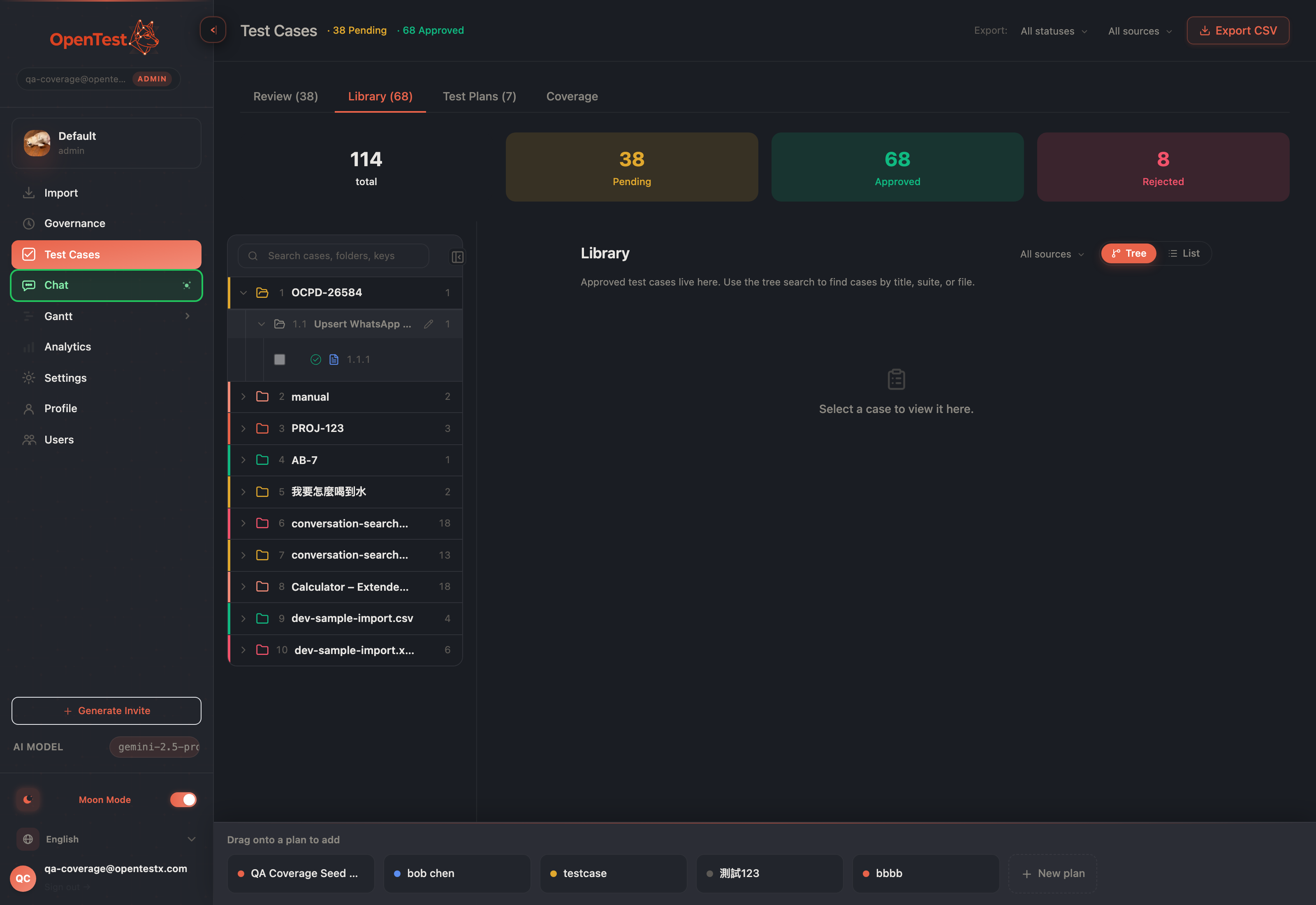
The drop strip appears only while you drag — each chip is a plan ready to receive the case.
The drop strip, pinned across the tree and detail panes, present only for the duration of the drag.
Zero idle pixels
The strip isn't a permanent toolbar eating a slice of the screen. It exists only for the seconds your drag is in flight — it materializes when you pick up a case and vanishes the instant you drop, cancel with Esc, or let go off-target. When you're not dragging, it costs nothing. The affordance is exactly as big as the moment that needs it.
Only the plans that can actually take it
The strip doesn't list every plan you have — it lists the ones that can accept the case. Drafts, active plans, executing plans, paused plans: all valid targets. Archived plans and completed plans are excluded, and the completed one is the interesting case.
A completed plan is a closed ledger — every case in it accounted for, the plan signed off. Drop a fresh, not-yet-run case into it and you'd silently reopen that ledger: a plan that reads "complete" while quietly holding work that was never done, with no automatic path back to executing. That's a closed book a colleague reopened by accident and nobody noticed. So we don't allow it. The drop strip simply never offers a completed plan as a target — the constraint is visible in what you can aim at, not buried in an error after you've already let go.
Drop the same case twice, and nothing breaks
Drag a case onto a plan it's already in and you don't get a duplicate row or a red error. The server dedups it and hands back a quiet "already in plan" note — the same friendly result the picker modal gives you. Drop on a brand-new plan and the case rides into the plan the moment it's created. The mechanics stay out of your way.
An enhancement, not a replacement
Drag-and-drop is a mouse, large-screen nicety — a faster path for the common move, not the only one. The picker modal stays exactly where it was: the keyboard path, the accessible path, the way to stage many cases at once. We added a shortcut for the impatient moment without taking anything away from anyone who needs the deliberate one.
It's a small thing. But staging plans is something a QA lead does dozens of times a sprint, and shaving a modal round-trip off the most common move — while quietly refusing the one move that would corrupt a closed plan — is the kind of small thing that adds up.
Curious how this looks inside your team?
Book a short consult and we will walk through how OpenTestX maps to your current QA system.
Book a consultation →Related posts
How we kept a red-team feature from being security theater
The hardest part of shipping a red-team feature isn't writing attacks — it's not faking them. Our merge gate: every attack bank must make a vulnerable agent go red and a hardened agent go green, or it fails the build. A probe that can't tell a broken agent from a fixed one is theater. This is the gate, and the three real bugs it caught by going red first.
Red-teaming an agent, without writing a single attack: a walkthrough
We added promptfoo's red-team thinking to Eval Studio by fusing it into the eval spine instead of bolting it on — our leak-veto was already an attack grade. This post is the concrete walkthrough: pick attack plugins from a library, run them against your agent, and read a matrix that says 'held against this probe' — never 'safe'. Built and merged, not yet deployed.
An access-control eval that actually arrives as the user
An access-control test is worthless unless the request arrives as the role being tested. So in Eval Studio each role carries a real credential — a pasted revocable token, or one minted against your own endpoint — and a cross-role leak-veto runs as an engine default, not an opt-in. This post walks through setting one up. Built and merged, not yet deployed.