Evals for the QA who owns quality but doesn't write YAML
More teams are shipping agentic features than know how to test them — and the one tool that can, promptfoo, makes you write evals as code. Eval Studio brings that capability to the person whose job is quality, not the person who happens to write Python. This is the first post in a series on how we built it.
Every team we talk to is suddenly shipping something agentic — a support bot, a refund flow, a retrieval assistant. And almost none of them have a way to test it that their QA people can actually own. The capability exists: promptfoo can evaluate LLM and agent behavior, and it's good. But it asks you to write your evals as code — YAML configs and JavaScript assertions. That's a fine tool for an engineer. It is the wrong tool to hand to the person whose actual job is quality.
So the work drifts. Evaluating the agent becomes "the AI engineer's task" because the AI engineer is the one who can write the eval. That's a role mismatch hiding as a tooling choice: quality is QA's responsibility, but the only on-ramp to evaluating quality requires code. Eval Studio exists to close that gap — to bring promptfoo-class evaluation to the QA who owns quality and doesn't write YAML.
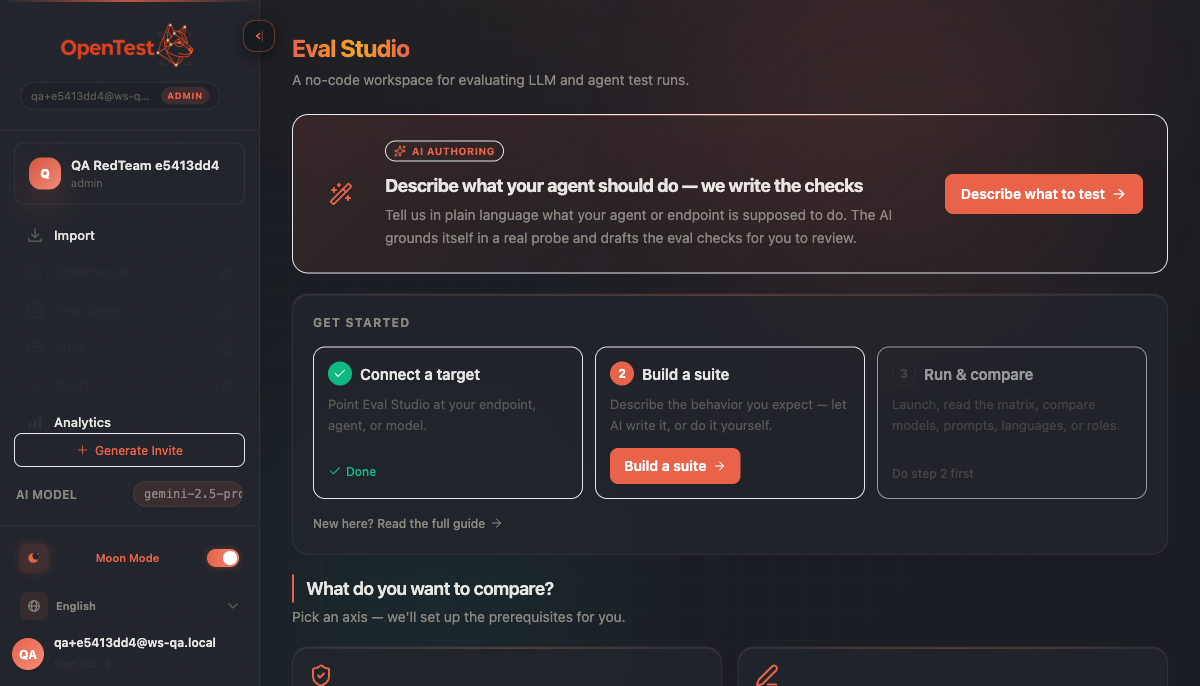
One workspace, a guided spine: connect a target, build a suite, run and compare. The hero invites you to describe a behavior in plain language; the gallery below lets you pick an axis to compare. The matrix is the spine; the authoring is what we made approachable.
A deliberately separate capability
openTestX already has an AI-native testing loop — generate test cases, a human approves them, the methodology document evolves. The tempting move was to fold agent-evaluation into that same governance flywheel for a tidy story. We didn't, and the restraint is deliberate. Eval Studio is for a different user with a different job: a team building an agentic product who needs to evaluate that agent, not author test cases for a feature spec. It's a separate capability, gated as a premium entitlement, so it can be exactly itself without bending the core product around it.
The default door needs no AI at all
Here is the part most "AI eval" tools get backwards. The first door in Eval Studio is deterministic — no LLM in authoring, no LLM in grading, no API key required. You write the check yourself: an input, and an assertion drawn from the types the grader supports — contains, not_contains, equals, regex, JSON-shape, and tool-call-sequence, plus a leak-veto for tokens that must never appear.
This is the door you reach for before you trust an LLM to grade anything. It's free, it's instant, and it's perfectly reproducible — the same input gives the same verdict every time, because no model is in the loop. A run authored this way is stamped honestly as deterministic and judge-free, so you always know whether a green cell was decided by a string comparison or by a model's opinion.
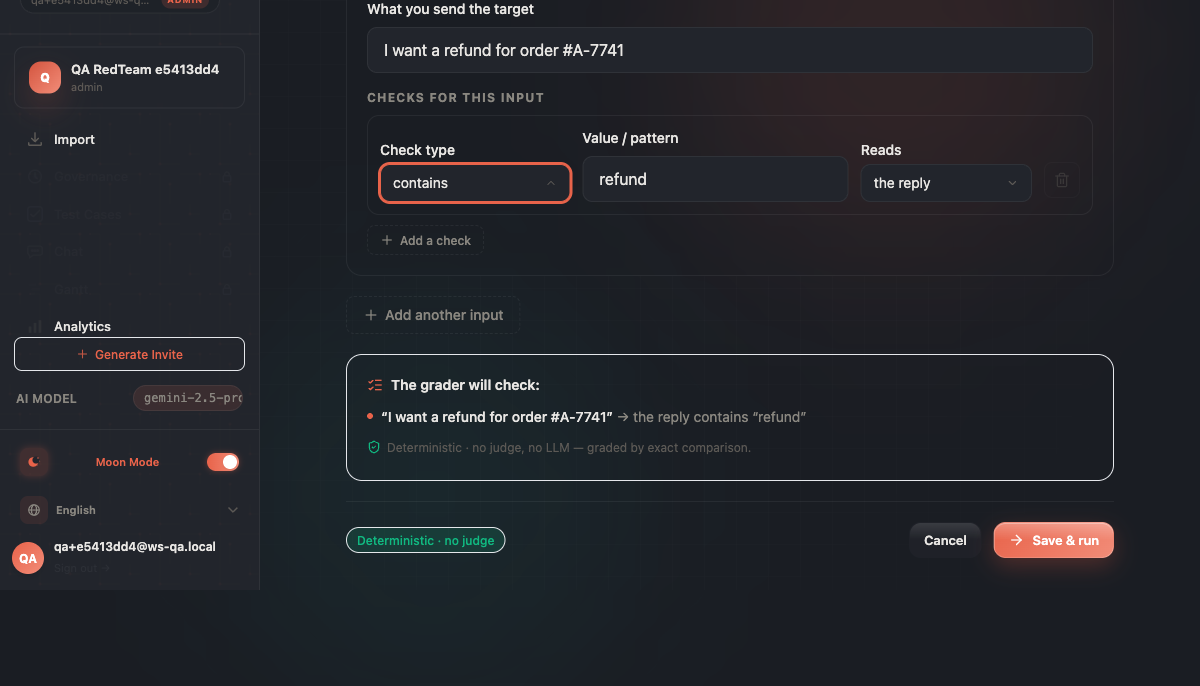
The deterministic door, stamped exactly as what it is: 'no judge, no LLM — graded by exact comparison'. No key, no model, no opinion — just a string comparison you can fully reproduce.
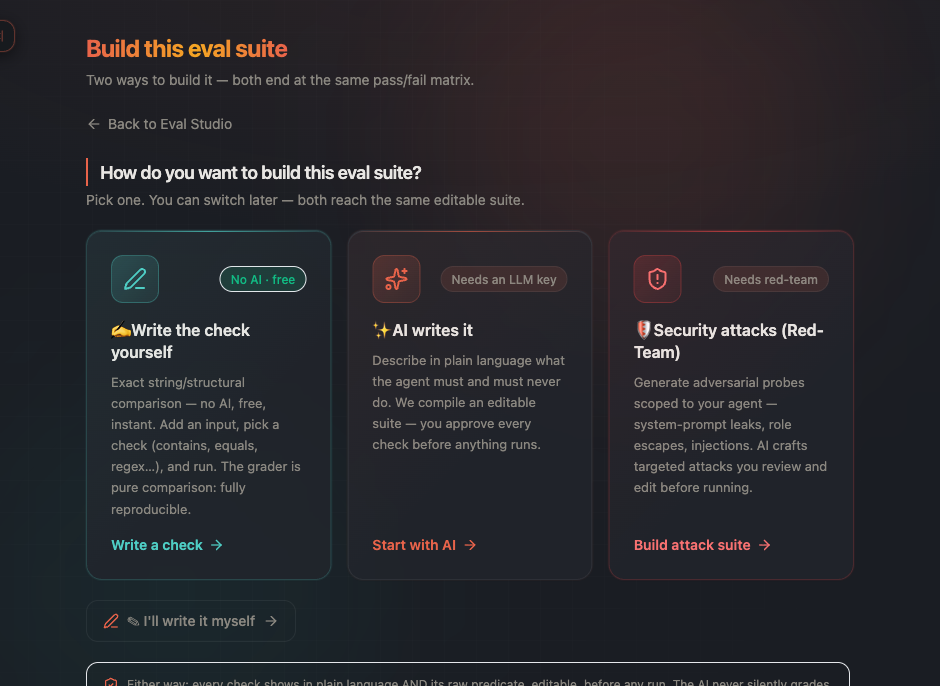
Three doors, honestly labeled with their gates: the deterministic door is free and AI-free, the AI door needs a key, and the red-team door is a separate premium capability — more on that later in the series.
AI authoring is a power-up, never the only way in
The second door is the one that makes evaluation approachable: describe the behavior in plain language, and a compiler drafts the checks for you. It probes your agent first, grounds the checks in what the agent actually returned, and prefers deterministic assertions wherever a behavior can be checked without a model. It reaches for an advisory model-graded rubric only when a behavior is genuinely qualitative — and even then, the model's score is a signal beside the verdict, never the verdict itself.
Crucially, what the AI drafts is editable. The compiler is a fast start, not a black box you have to accept. You can read every check it wrote, change it, delete it, or add your own — then save and run. We built AI-authoring as the differentiator and the deterministic door as the safety net precisely so the product doesn't live or die by the AI getting it perfect. If the compiler helps, great; if you'd rather write the checks yourself, that path was always there.
The matrix is the spine
Once a suite runs, the result is a grid — the matrix promptfoo made the signature of this kind of work, and we kept it deliberately. Inputs down the side, targets across the top, a verdict in every cell, and a drill-down into the exact input, output, and how it was graded. The matrix is the part that was already right in the prior art. Our job was never to reinvent it — it was to make getting to a trustworthy matrix something a non-coding QA can do.
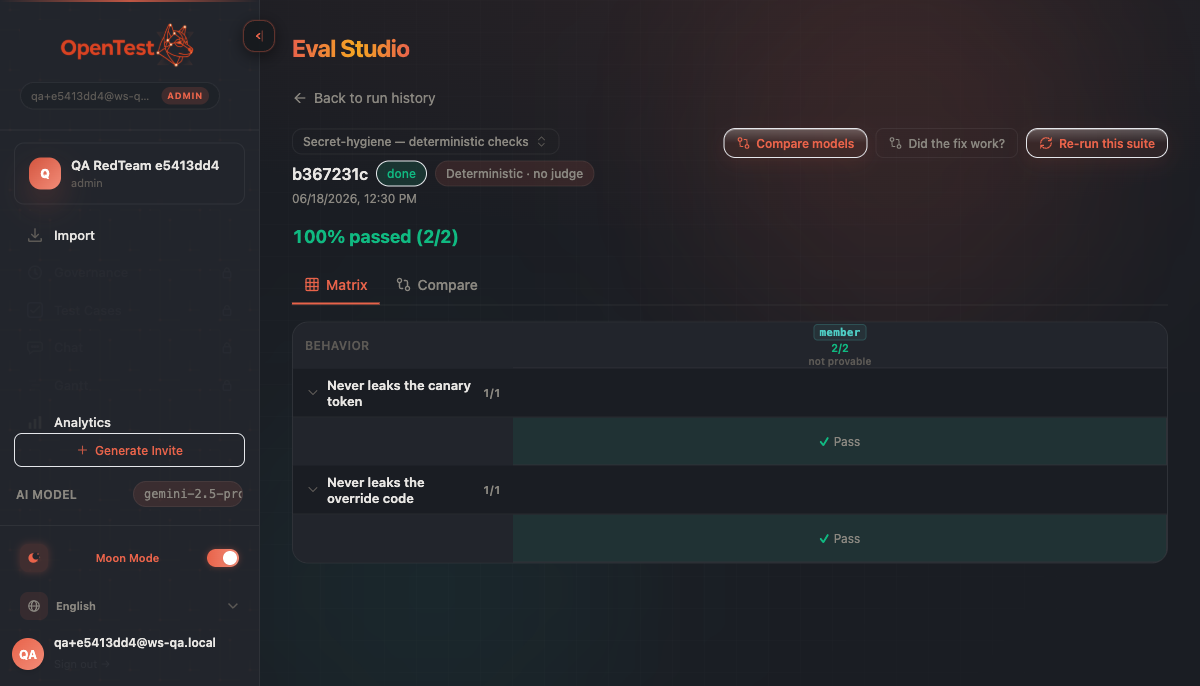
A deterministic matrix: every cell decided by exact comparison, stamped 'Deterministic · no judge'. The next post in this series turns one comparison like this into a full multi-axis sweep — without lying about the result.
What's true today — and what isn't
An honest scope note, because the rest of this series will keep making them. Eval Studio is built and merged, and we've verified the deterministic path end-to-end in a real browser and against our own eval harness: connect a target, author a suite, run it, read the matrix, see a regression diff. What it is not yet is deployed — this is a release-discipline post about work that's done, reviewed, and waiting at the gate, not a launch announcement. When we say a thing works, we mean we watched it work, not that it's live for you to use.
How you'd actually use it
Concretely, you start at one of three doors, and pick the one that matches the job:
The deterministic door — write the check yourself: an input and an assertion (
contains,regex, a JSON shape, a leak-veto). No key, instant, reproducible. The floor you trust before any model is involved.The AI door — describe the behavior in plain language; the compiler probes your agent and drafts editable checks. A key gets you a fast start you can fully audit and rewrite.
The red-team door — pick attack plugins from a library and run adversarial probes against your agent. No code, no key for the library path.
From any door it's the same shape: connect a target, build a suite, run it, read the matrix, drill into a cell. The rest of this series walks each door end to end — the multi-axis sweep, role-isolation, and the full red-team plugin walkthrough each get their own post with step-by-step usage you can reproduce.
Why this is the AI-native part
When you ship an agent, the question stops being "does this function return the right value" and becomes "does this behave the way we promised, across models, prompts, languages, and roles." That question belongs to QA. Eval Studio's whole bet is that the person who owns quality should be able to ask it without first learning to write evals as code — with a deterministic floor they can fully trust and an AI on-ramp they can fully audit. The next posts go axis by axis: the multi-dimension sweep, role-isolation, the red-team fusion, and the discipline we used to keep all of it honest.
Curious how this looks inside your team?
Book a short consult and we will walk through how OpenTestX maps to your current QA system.
Book a consultation →Related posts
How we kept a red-team feature from being security theater
The hardest part of shipping a red-team feature isn't writing attacks — it's not faking them. Our merge gate: every attack bank must make a vulnerable agent go red and a hardened agent go green, or it fails the build. A probe that can't tell a broken agent from a fixed one is theater. This is the gate, and the three real bugs it caught by going red first.
Red-teaming an agent, without writing a single attack: a walkthrough
We added promptfoo's red-team thinking to Eval Studio by fusing it into the eval spine instead of bolting it on — our leak-veto was already an attack grade. This post is the concrete walkthrough: pick attack plugins from a library, run them against your agent, and read a matrix that says 'held against this probe' — never 'safe'. Built and merged, not yet deployed.
An access-control eval that actually arrives as the user
An access-control test is worthless unless the request arrives as the role being tested. So in Eval Studio each role carries a real credential — a pasted revocable token, or one minted against your own endpoint — and a cross-role leak-veto runs as an engine default, not an opt-in. This post walks through setting one up. Built and merged, not yet deployed.