The AI rewrites your Gherkin — one click brings the original back
Every content edit to a test case now snapshots a version, with a server-computed diff. So when the AI rewrites a scenario to fix a review finding, the byte-exact original is one click away. AI you can audit and undo.
Your methodology doc had an undo button. Your test cases didn't.
A test case is a living artifact. A reviewer tightens a title, fixes an untestable assertion the AI flagged, rewrites a scenario — and yesterday's wording is gone. There was no record of what the case said before, who changed it, or a way back. Meanwhile the methodology doc — MEMORY.md — already had that safety net: versioned history and restore, the thing the team quietly trusts. The product's core artifact didn't.
Now it does. Every content edit to a test case is captured as a numbered version, attributed to who made it, recoverable. The safety net the team trusts for its methodology now covers the cases themselves.
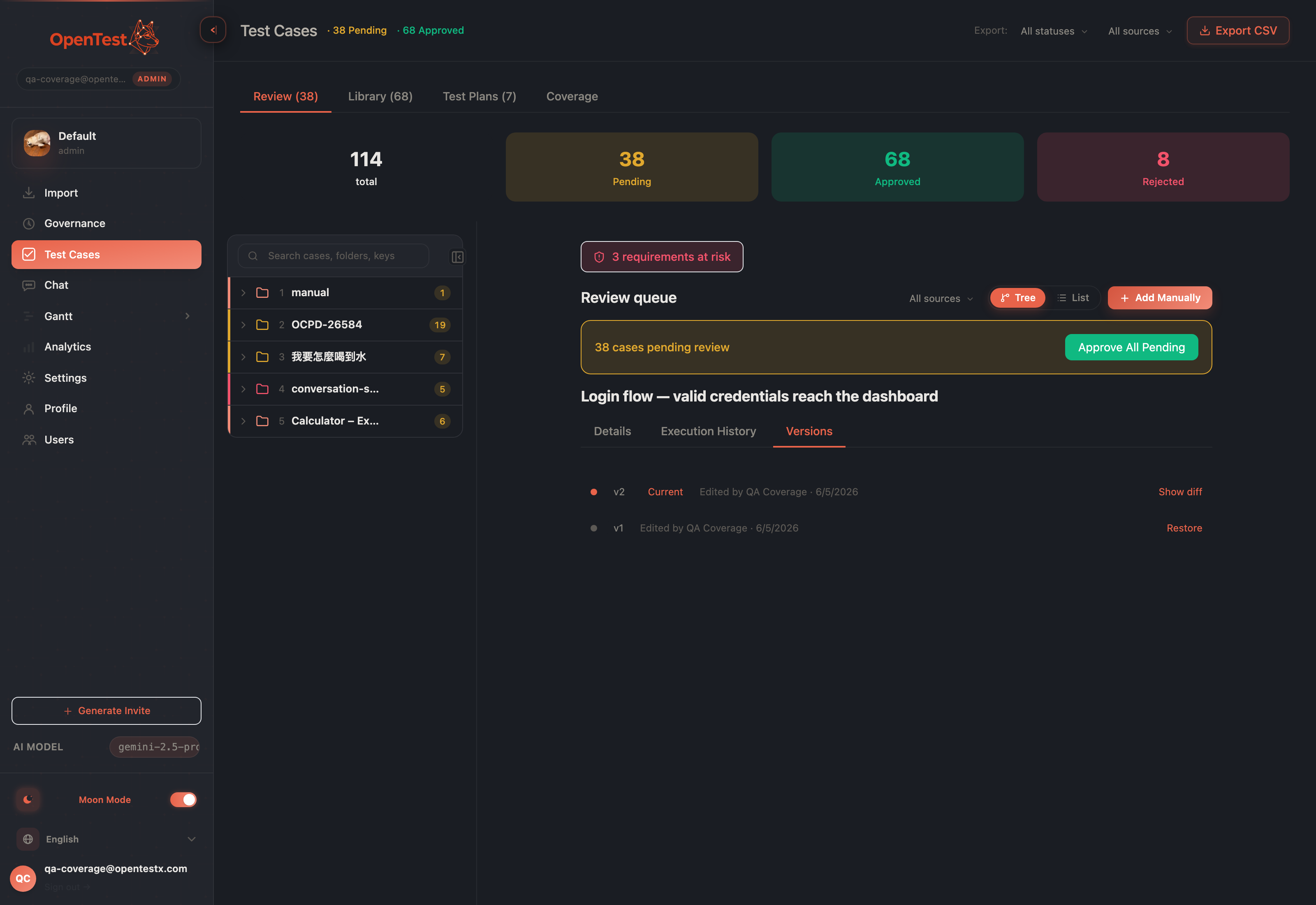
A Version history tab beside Details and Execution History — every content edit, numbered, attributed, newest first.
The version list: each content edit is a numbered, attributed entry you can expand.
What gets a version — and what deliberately doesn't
A version is born only when an edit changes content — the eight fields that make up the case: title, the Given/When/Then steps, the verbatim Gherkin scenario, type, priority, and tags. Approving a case, flipping a regression flag, moving it between folders, re-running a plan — none of these write a version. That's a deliberate line. Versioning a status flip would flood the history with rows that changed nothing, and "what did this case actually say?" would become unanswerable. The history answers exactly one question, cleanly: what was the scenario, and who wrote it that way.
This is lazy — there's no migration backfilling old cases. A case that's never been edited synthesizes a calm "v1 — created" entry from its current content; the first real edit writes the prior content as v1 and the new content as v2. No startup scan over a large table, nothing to roll back but an inert table.
A diff per version, computed on the server
Expand any version and you see what changed — a diff against the adjacent version, computed server-side and handed to the same diff viewer the methodology approvals use. When the case has a verbatim Gherkin scenario, you get a Gherkin text diff; a legacy three-field case falls back to a Given/When/Then diff. Added and removed lines stay distinguishable without relying on color alone.
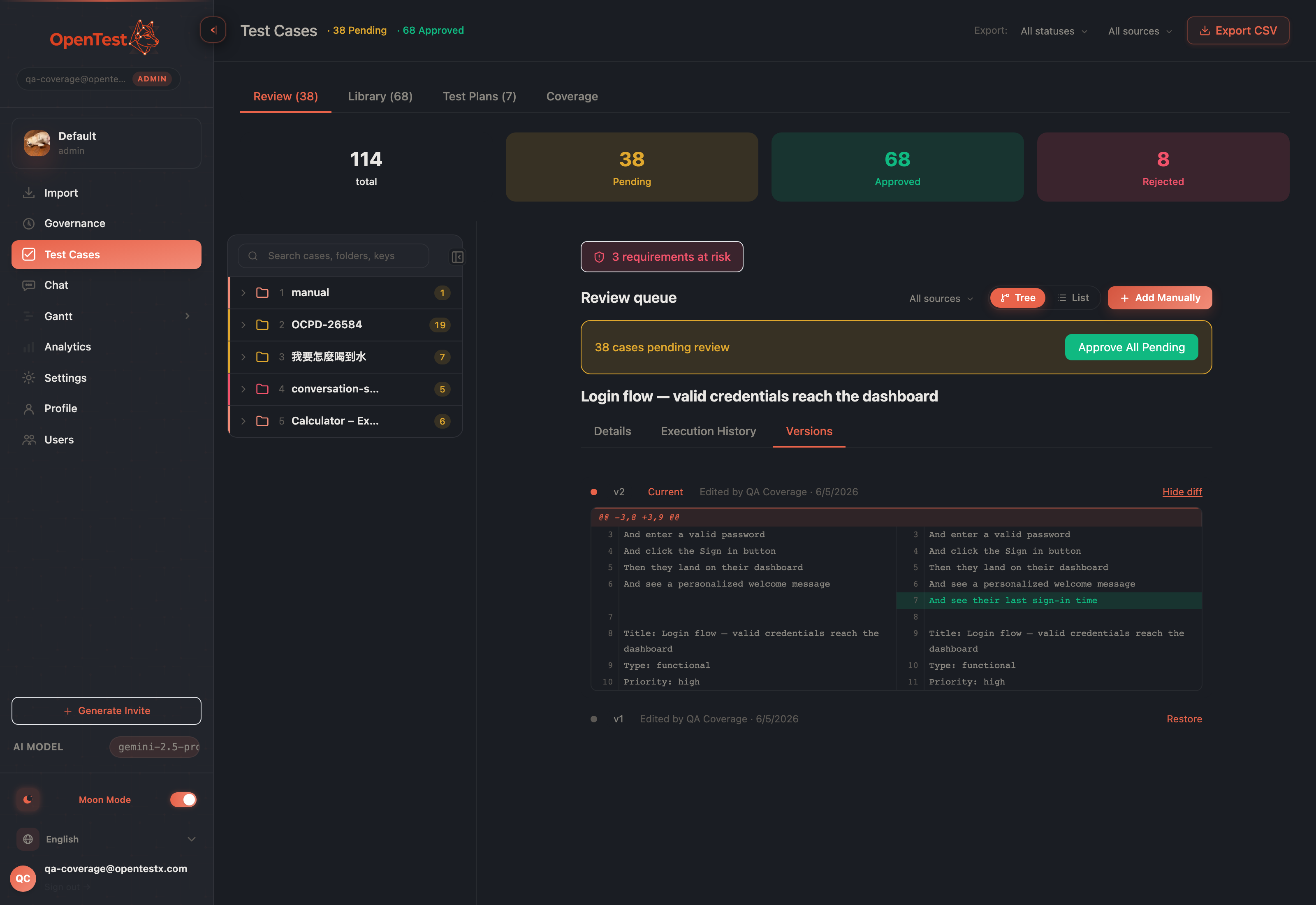
Each version expands to a diff against its neighbor — Gherkin when present, three-field GWT when not.
The per-version diff: exactly what changed, line by line, between adjacent versions.
Restoring is content-only and confirm-gated. It writes the snapshot's content back to the live case and touches nothing else — not the plans the case sits in, not its execution log, not its status — except for one safety move that matters: restoring an already-approved case drops it back to pending and clears the approval. A scenario that changed out from under an approval has to earn that approval again. Undo shouldn't smuggle unreviewed content past the gate.
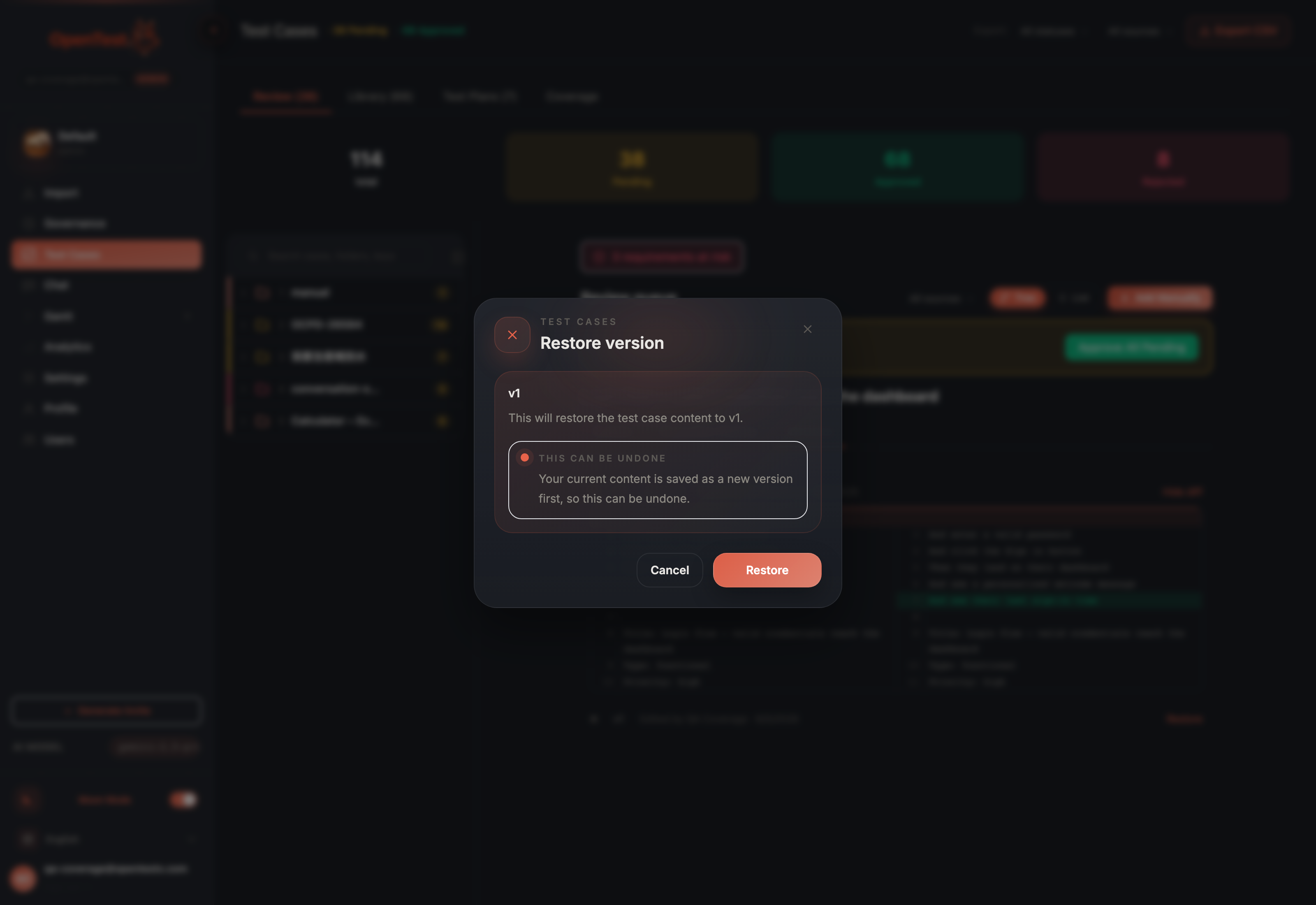
Restore is confirm-gated — it overwrites the live scenario, so it asks first.
The restore confirm: a content-only overwrite, gated behind an explicit yes.
The payoff: an AI rewrite you can undo in one click
Here's where versioning earns its keep. On a pending case's review finding, there's an action — 依此修正 Gherkin, "fix the Gherkin from this finding." The AI rewrites the scenario to address that one finding: it adds the missing negative path, tightens the vague assertion, and leaves the rest of the scenario alone. The moment it does, three things happen in a single transaction — the prior version is snapshotted before the rewrite lands, the finding resolves, and a banner appears offering one-click revert.
That revert isn't an approximation of the old scenario. It restores the byte-exact original — the snapshot taken before the write, replayed verbatim. You let the AI take a swing at your Gherkin knowing the original is never more than one click behind you. That's the whole proposition: AI you can audit and undo, not AI you have to trust blind.
We made the AI rewrite earn the trust
A rewrite that addresses one finding has a sharp failure mode: the model "fixes" the missing-coverage gap by replacing the happy path with the edge case instead of adding alongside it — silently deleting steps you wrote. We gated the rewrite behind an evaluation, and that eval caught exactly this: the model swapping rather than adding. We hardened the prompt with a mechanical invariant and an add-don't-replace example until the eval ran clean three times out of three across repeated runs.
Honest scope: that eval is structural, not a guarantee. It checks that the rewrite adds rather than silently deletes — it does not certify the new scenario is correct for your product. That's still your call, which is the whole reason the original is one click away. Behind the scenes, every edit records where it came from — human edit, AI generation, AI fix, or restore — written down now for an audit trail we'll surface later.
Reversible by default, all the way down
The honest edges, stated plainly: versions cover the eight content fields, not folder moves or status churn — those are tracked elsewhere and don't belong in a scenario's history. The diff is between adjacent versions, not arbitrary pairs. And the AI fix addresses one finding at a time, by design — it's a scalpel, not a rewrite-the-whole-thing button.
What you get is a core artifact as safe as the methodology doc beside it: every edit reversible, every editor named, and the most powerful edit of all — the AI's — always undoable in a single click. Let the model write. Keep the original.
Curious how this looks inside your team?
Book a short consult and we will walk through how OpenTestX maps to your current QA system.
Book a consultation →Related posts
How we kept a red-team feature from being security theater
The hardest part of shipping a red-team feature isn't writing attacks — it's not faking them. Our merge gate: every attack bank must make a vulnerable agent go red and a hardened agent go green, or it fails the build. A probe that can't tell a broken agent from a fixed one is theater. This is the gate, and the three real bugs it caught by going red first.
Red-teaming an agent, without writing a single attack: a walkthrough
We added promptfoo's red-team thinking to Eval Studio by fusing it into the eval spine instead of bolting it on — our leak-veto was already an attack grade. This post is the concrete walkthrough: pick attack plugins from a library, run them against your agent, and read a matrix that says 'held against this probe' — never 'safe'. Built and merged, not yet deployed.
An access-control eval that actually arrives as the user
An access-control test is worthless unless the request arrives as the role being tested. So in Eval Studio each role carries a real credential — a pasted revocable token, or one minted against your own endpoint — and a cross-role leak-veto runs as an engine default, not an opt-in. This post walks through setting one up. Built and merged, not yet deployed.